Types of Flight Delay Notifications, Explained Simply
Every flight delay notification falls into two buckets: what caused the delay, and what event is being reported. The cause taxonomy runs carrier, late aircraft, NAS (air traffic and airport system), weather, security, and OPSNET, categories the Bureau of Transportation Statistics and IATA both use in some form. The event types you actually see on your phone are narrower: departure delay, arrival delay, gate change, cancellation, diversion, tarmac delay, and connection problem.
If you get any of those alerts, the single move that matters is checking the updated ETA against your next commitment, whether that’s a connecting flight or a driver waiting at arrivals, and acting on it immediately rather than waiting for a second confirmation.
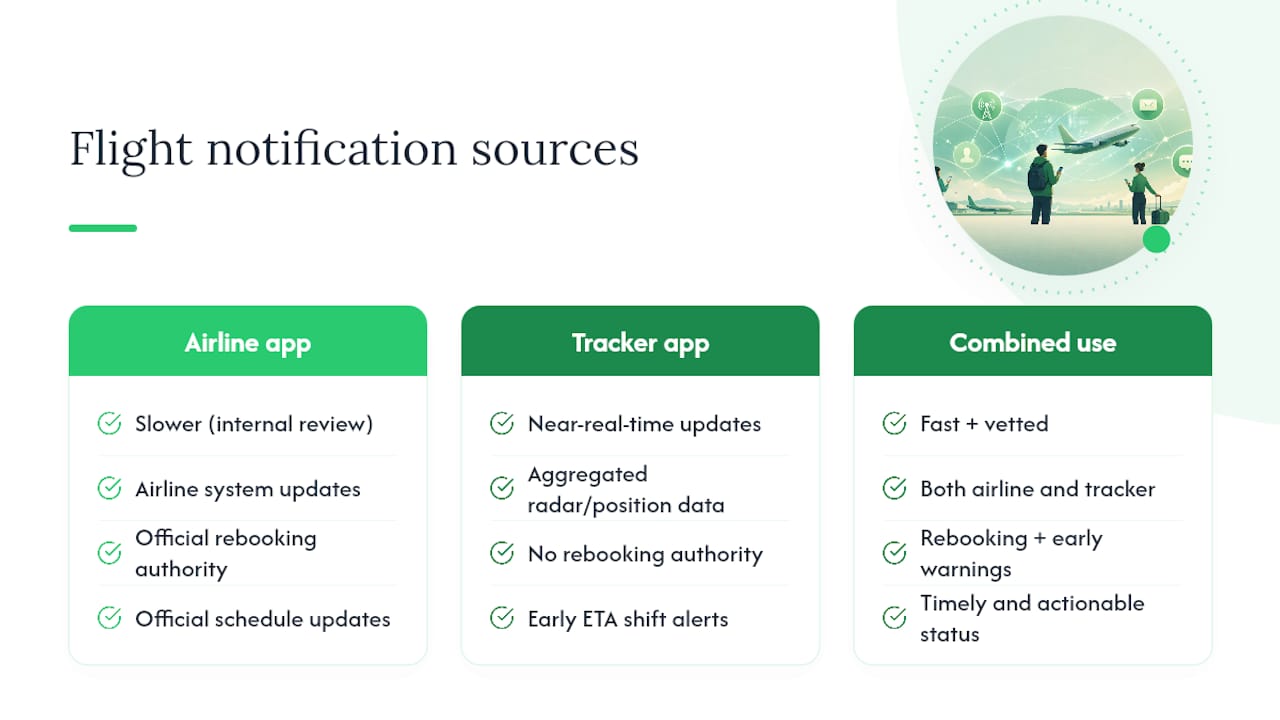
Where the alert comes from changes how fast it reaches you. Airline apps sometimes lag because carriers review updates before pushing them out, while aggregators like FlightAware or Cirium’s FlightStats pull from radar and position data and can post before the airline app does, a pattern OAG has documented in its flight status data guide. Airport FIDS screens sit somewhere in between, useful for gate numbers but often a step behind app pushes for departure timing.
- Cause categories: carrier, late aircraft, NAS, weather, security, OPSNET
- Event types: departure delay, arrival delay, gate change, cancellation, diversion, tarmac delay, connection problem
- Fastest sources tend to be: position-based aggregators, followed by airline apps, then airport screens
Pro Tip: Turn on notifications from your airline app and one independent tracker at the same time. When they disagree, trust whichever one moved first.
Roughly 5 to 15 minutes of ETA drift is usually enough to trigger a preliminary alert from a tracking API, well before an airline calls it an official delay.
Key Takeaways
Understanding which delay-cause category applies to your flight tells you who controls the fix, and knowing the notification event type tells you what to do next.
| Point | Details |
|---|---|
| Six cause categories exist | Carrier, late aircraft, NAS, weather, security, and OPSNET each assign responsibility differently. |
| Event types drive action | Departure delay, gate change, cancellation, and connection problem alerts each call for a different immediate step. |
| Aggregators often move first | Tools using radar or position data can post updates before airline apps due to editorial review delays. |
| Thresholds vary by system | Preliminary alerts often trigger at 5 to 15 minutes; formal delays typically escalate past 30 minutes. |
| Document everything for claims | Screenshots of alerts and timestamps support compensation claims under frameworks like EC 261/2004. |
| Zont Cab tracks flights automatically | Fixed-price transfers across 120+ European cities adjust pickup timing using the same live flight data this article explains. |
Table of Contents
- The Standard Delay-Cause Taxonomy: What Each Label Really Means
- Notification Event Types: What You’ll Actually See on Your Phone
- Where Delay Alerts Come From and Which Ones Update First
- Reading the Codes: ETA, ETD, and Delay Timestamps
- What to Do When You Get a Delay Alert (And What Your Rights Are)
- Frequently Asked Questions
- Sources
The Standard Delay-Cause Taxonomy: What Each Label Really Means
When an airline or a tracking app labels a delay, it’s assigning blame, in the operational sense, not the emotional one. That label determines who fixes it and, often, whether you’re owed anything.
Carrier delay covers problems the airline itself created: crew scheduling gaps, aircraft cleaning that ran long, mechanical issues found at the gate. If your app shows “carrier delay,” the airline controls the timeline and the airline owns the fix, which usually means rebooking options come faster.
Late arrival delay is really a carrier delay’s shadow. The inbound aircraft was late, so your flight starts late too. It’s coded separately because the root cause happened somewhere else in the airline’s network, but functionally you’re still waiting on the airline to sort it out.
NAS delay (National Airspace System, to use the FAA’s own phrase) covers air traffic control restrictions, airport congestion, and runway closures unrelated to weather. Nobody at your gate can fix this. It’s a systemic bottleneck, and airlines have limited room to negotiate around it.
Weather delay is self-explanatory but often misapplied. Airlines sometimes code weather delays broadly even when only part of the disruption is genuinely storm-driven, because weather delays typically carry fewer compensation obligations than carrier delays.
Security delay covers TSA-style screening issues, security threats, or evacuated terminals. Rare, but when it happens it cascades fast across an entire airport.
OPSNET/operations delay is the catch-all industry analysts use for internal airport and airline operational hiccups that don’t fit neatly elsewhere, ground crew shortages, baggage system failures, gate conflicts.
A delay coded “NAS” and a delay coded “carrier” can look identical from your seat, both mean you’re sitting on the tarmac, but only one of them puts the airline on the hook for rebooking you onto a competitor’s flight.
Airlines also track more granular internal subcodes for their own operations reporting, closer to how IATA’s delay code system breaks disruptions into numbered groups covering passenger and baggage handling, cargo, aircraft technical faults, weather, ATC restrictions, and miscellaneous causes. Those subcodes rarely surface in a passenger app, but they’re what your airline’s ops team is actually looking at.
- Carrier and late-arrival delays: airline controls the fix, rebooking is usually faster
- NAS and weather delays: airport/ATC controls the fix, airline has limited leverage
- Security delays: airport authority controls the fix, expect terminal-wide disruption
- OPSNET delays: internal operations issue, resolution timing is unpredictable
Pro Tip for staff: If a delay is coded NAS or weather, don’t promise passengers a fast resolution, that decision sits with the airport authority, not your desk. Pro Tip for travelers: A “carrier delay” label is actually good news, it usually means you qualify for airline-funded rebooking or meal vouchers faster than a weather-coded delay would.
Notification Event Types: What You’ll Actually See on Your Phone
The cause taxonomy above explains why. This section covers what, the actual alert types that show up as push notifications, texts, or FIDS updates.
- Departure delay — your flight’s scheduled takeoff moved later. Often starts as a soft ETA nudge before becoming an official delay tag.
- Arrival delay — your destination time shifted, sometimes without any change to departure (a faster or slower route can cause this on its own).
- Gate change — usually unrelated to timing, but worth treating as urgent if you’re already moving through the terminal.
- Boarding start — confirms the flight is proceeding; a late boarding start after a delay alert is a good sign the airline caught up.
- Tarmac delay — you’re on the plane but not moving; regulations require airlines to report extended tarmac holds separately from gate delays.
- Cancellation — the flight isn’t happening; this triggers automatic rebooking in most airline systems, but not always the fastest option.
- Diversion — the aircraft is landing somewhere other than planned, usually weather or fuel-related, and reshuffles every downstream connection.
- Connection problem — a flag some airline apps generate automatically when your inbound delay eats into your layover window.
A single root cause can generate multiple, seemingly contradictory alerts. A late-arrival delay might first appear as a quiet ETA shift five minutes off schedule, then escalate to a formal “departure delay” push twenty minutes later once the airline confirms the inbound aircraft won’t make its turnaround window. Treat the first alert as a warning and the second as a plan.
- Gate change alerts: walk toward the new gate before verifying if you’re already close
- Connection problem flags: contact the airline immediately, don’t wait for a rebooking offer
- Cancellation notices: check your airline’s app for rebooking before calling, it’s usually faster
Where Delay Alerts Come From and Which Ones Update First
Every notification you receive traveled through a chain, and that chain determines how fresh the information actually is by the time it reaches your screen.
Airline operations systems generate the first signal, typically as a movement message. That message gets translated by middleware into formats other systems can use, in a process built on standards like AIDX, before it reaches an airport’s flight information display system or your airline’s own app. Third-party aggregators often skip part of that chain entirely, pulling directly from radar and position telemetry instead of waiting for an airline’s internal review process.
That’s the practical reason FlightAware or Cirium’s FlightStats can show a delay before the airline’s own app does. Airlines sometimes hold back passenger-facing updates for operational or commercial reasons, an editorial layer that aggregators using ADS-B position data simply don’t have. Airport FIDS screens sit in a middle tier: reliable for gate assignments because that’s locally controlled data, but often a step behind for departure timing pulled from airline feeds.
- Airline app/SMS/email: authoritative for rebooking, sometimes delayed for review
- Airport FIDS: best for gate and terminal information, moderate latency
- Third-party aggregators (FlightAware, Cirium, OAG-fed tools): fastest for raw timing changes, less authoritative for rebooking decisions
- Middleware/API layers: invisible to passengers but responsible for most of the translation delay in the chain
Pro Tip: Set up your airline’s app for rebooking authority, and a tracker like FlightAware or a service using Cirium’s feed for early warning. When one moves before the other, that gap is often several minutes, which can be enough time to act first.
Reading the Codes: ETA, ETD, and Delay Timestamps
Two timestamps drive almost every notification you’ll get: ETD (estimated time of departure) and ETA (estimated time of arrival). Behind the scenes, operations teams also track OOOI times, out of the gate, off the ground, on the ground, into the gate, which feed the ETA/ETD updates that eventually reach your phone.
Airlines internally attribute delays using IATA’s coded system, organized into numbered groups covering passenger and baggage issues, aircraft handling, technical faults, weather, air traffic control, and miscellaneous causes. You won’t see “code 93” on your app, but it’s what shows up in the movement message your airline files.
A typical progression: a five-minute ETA drift appears quietly first, often not even flagged as a delay. If it grows past 15 to 30 minutes, most systems escalate it to a formal “delayed” status. Past a certain point, usually airline-specific, it triggers automatic rebooking prompts.
| Field | What it tells you |
|---|---|
| ETD | Current estimated departure time, updates as conditions change |
| ETA | Current estimated arrival time, can shift independent of ETD |
| OOOI times | Internal tracking of gate, takeoff, landing, and gate-in events |
| IATA delay code | Airline’s internal attribution of cause, rarely passenger-visible |
Thresholds and code structures vary by airline and airport system, so treat any specific minute-range as a general pattern rather than a fixed rule.
What to Do When You Get a Delay Alert (And What Your Rights Are)
The first 30 minutes after any delay notification matter more than anything that happens afterward, because that’s your window to act before rebooking options fill up.
- Verify the ETA immediately against your original schedule and any connection you’re protecting.
- Check the gate assignment on the airport’s FIDS screen, not just the airline app, since gate data is locally sourced and usually accurate.
- Contact your ground transfer or chauffeur service as soon as the delay is confirmed, not after landing, so the pickup adjusts in real time instead of scrambling.
- Confirm rebooking options through the airline app before calling customer service; most airlines process app-based rebooking faster than phone queues.
- Screenshot everything: the delay notification, the timestamp, and your original boarding pass. These become your documentation if you file a claim later.
For connections, the math is simple: if your layover window is shorter than the delay length plus airport transit time, contact the airline before you land, not after. Waiting in the jet bridge to figure it out costs you minutes you don’t have.
If your flight departs from or arrives within the EU, EU Regulation EC 261/2004 sets out compensation rules tied to delay length and distance. The rules are specific to route and cause, so treat this as a starting point and confirm your exact case against the regulation or your airline’s own policy rather than relying on general guidance.
Pro Tip: Save every delay notification as a screenshot the moment you receive it, timestamps matter more than memory when you’re filing a claim weeks later.
Documentation matters more than most travelers assume. Airlines and claims processors want timestamped proof, not a recollection of “the flight was delayed for hours.” A screenshot of the original notification, another of the final rebooking confirmation, and your boarding pass cover most of what a compensation claim requires.
When Alerts Trigger: Typical Thresholds
Notification systems compare live flight data against a baseline schedule, and most platforms use configured thresholds to decide when a shift becomes alert-worthy. A 5 to 15 minute ETA change commonly triggers a soft, preliminary update, the kind you might not even notice. Once a delay crosses roughly 30 minutes, most systems escalate to a formal delay notice, and cancellations or diversions trigger immediately regardless of duration.
- Preliminary ETA shift: often 5 to 15 minutes, low urgency
- Formal delay notice: typically 30+ minutes, treat as confirmed
- Cancellation or diversion: immediate alert, no threshold applies
These ranges are illustrative. Every airline and airport configures its own middleware differently, so the same 12 minute shift might trigger an alert at one airport and stay silent at another.
A Transfer Provider’s View on Why Alert Accuracy Matters
Every delay type changes how we allocate drivers. A weather-coded NAS delay affecting an entire airport means we hold multiple vehicles simultaneously; a single carrier delay means one adjusted pickup time. What actually damages a transfer service isn’t the delay itself, it’s acting on stale data. A driver dispatched off a 20-minute-old notification arrives at the wrong moment, every time. Fast, source-verified alerts, not just any alert, are what let a chauffeur service like Zont Cab hold a pickup window instead of guessing at one.
A Monitored Pickup Beats Guessing at Your Landing Time
Checking three notification sources during a stressful layover isn’t a system, it’s a workaround. Zont Cab builds flight tracking directly into every airport transfer, so your driver already knows about a gate change or a tarmac delay before you’ve finished reading the alert yourself.
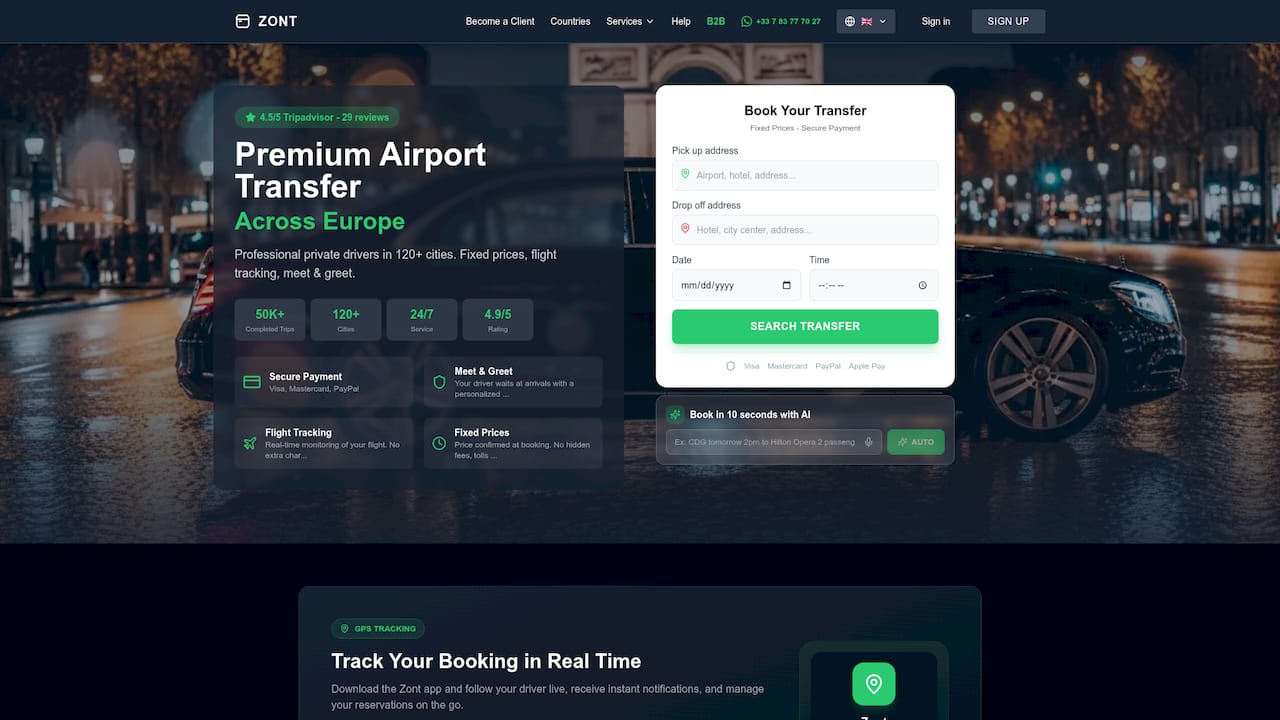
That means no frantic calls to adjust your pickup time and no fee for a flight that landed late. Fixed pricing holds regardless of delay length, and your driver’s holding buffer adjusts automatically against the same live data feeds this article just walked through. Across 120-plus cities in Europe, that’s the difference between arriving to find your name on a sign and arriving to an empty curb. If you’ve got a flight with connection risk or an unpredictable delay history, check availability for your destination and book a transfer that already knows your flight status before you land.
Frequently Asked Questions
What are the main types of flight delay notifications? The main types are departure delay, arrival delay, gate change, boarding start, tarmac delay, cancellation, diversion, and connection problem. Each reflects a different stage or consequence of an underlying delay cause like carrier issues, weather, or air traffic restrictions.
Why does my airline app show a delay later than a flight tracking app? Airline apps sometimes route updates through internal review before publishing them, while tracking apps using aggregated radar or position data can post changes as soon as they’re detected. This gap is a known pattern in how flight status data flows through the industry.
What does a NAS delay mean, and is the airline responsible? NAS refers to National Airspace System delays, covering air traffic control restrictions and airport congestion. The airline doesn’t control this cause, which typically affects how quickly rebooking or compensation gets offered compared to a carrier-coded delay.
How do I know if a delay alert is preliminary or confirmed? Preliminary alerts usually reflect small ETA shifts of 5 to 15 minutes and can disappear if conditions improve. A confirmed delay notice typically appears once the shift crosses roughly 30 minutes or the airline formally updates its schedule.
Am I owed compensation for a flight delay? It depends on the delay’s cause, length, and whether your flight falls under a framework like EU Regulation EC 261/2004. Check the regulation directly or your airline’s policy for your specific route rather than relying on general assumptions.
Should I rely on just one notification source? No single source is reliable enough on its own. Combining your airline’s app with an independent tracker gives you both rebooking authority and faster early warnings when timing shifts.
This article is general information, not a substitute for advice from a qualified lawyer. Consult a qualified legal professional about your own circumstances before acting on anything here.